Remove an Object from a Photo Without Cropping It
To remove an object from a photo, upload the picture to Create photo and say what has to go: the stranger behind you, a trash can, wires across the sky. The AI repaints that spot from its surroundings, so the shot keeps its framing.
Remove an objectReady in minutes · Free templates every day
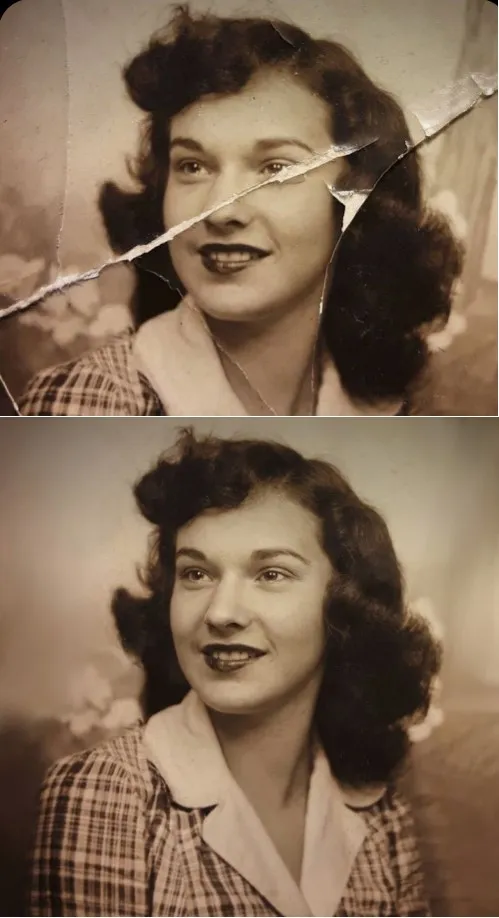
Cropping would cut away half the scene along with the problem. This is not a fill with the nearest color either: the model works out what the object was hiding and continues it, whether that is the edge of a wall, a lawn, a railing or rows of brick. The edited version lands in your history as a separate file, ready to download.
Say exactly what to erase and where
Name the object and its place in the frame: “Remove the man in the red jacket on the left”, “remove the wires above the roof”. A request like “remove everything distracting” hands the choice to the model, and the result turns into a lottery. Describe colors and positions the way you would point them out to a friend.
Photobombers and passers-by
A stranger walking through your shot should go together with their shadow, otherwise the shadow gives the edit away, so mention both. When someone partly overlaps the main subject, the uncovered part of that subject is redrawn from what is visible: an arm, a shoulder, the edge of a sleeve. Work with your own photos or ones you have permission to edit.
Wires, bins and signs: the easy cases
Objects that stand apart from a plain background disappear most cleanly: power lines against the sky, a trash can on asphalt, a road sign over a field, a bottle on a tablecloth. The simpler the surface behind the object, the less there is to invent, so the repaired area blends in. When wires cross the entire frame, take them out in two or three passes rather than one.
When the repair is easy to spot
Results get weaker when the object sits inside a busy pattern, when it is a reflection in glass or a mirror, or when it covers half the frame. In those cases the model has to invent too much, and the rebuilt area can differ in texture from its surroundings. A more precise description sometimes helps, and so does another photo model; if neither works, cropping may still be the better fix.
Ready-made templates







FAQ
Will a smudge be left where the object was?
Usually not, because the gap is redrawn to match its surroundings rather than filled with one flat color. On busy textures such as leaves, gravel or patterned fabric, zoom in before you share the picture: the rebuilt patch can look slightly different there.
Can I remove several objects in one run?
Listing two items in one request can work, yet separate runs are more dependable: each pass gives the model a single clear job, and you can stop as soon as the frame looks right. Download the cleaned version and use it as the input for the next pass.
Is removing unwanted objects from a photo free?
Not completely: each run is paid in stars, and the photo model you pick displays its cost before anything starts. Your first 5 stars arrive when you verify the email on a new account; beyond those, you top up with a plan or a single star pack from the Pricing page.
Can I erase objects from a photo on my phone?
Yes, in the phone's browser: open the site, sign in, upload the shot from your camera roll and type the request. There is no app to install, and the same account works on a computer, so you can start on one device and download on the other.